

TL;DR:
- Workflow automation reduces non-billable time and streamlines repetitive legal tasks.
- Proper preparation, data quality, and human oversight are crucial for successful implementation.
- Automation shifts work nature, emphasizing rule-based tasks while underscoring the need for human judgment.
Manual processes are quietly costing law firms more than they realize. Attorneys spend hours on document preparation, deadline tracking, and client follow-ups that could be handled automatically. Administrative bottlenecks delay case progress and reduce the time available for billable work. This guide walks you through the full picture of workflow automation for law firms, from understanding the business case to executing your first automated process and measuring real results. Whether you manage a small practice or a large firm, you’ll find practical steps and honest guidance on what automation can and cannot do for your operations.
Table of Contents
- Why automate workflows in law firms?
- What you need to get started: Tools, requirements, and preparation
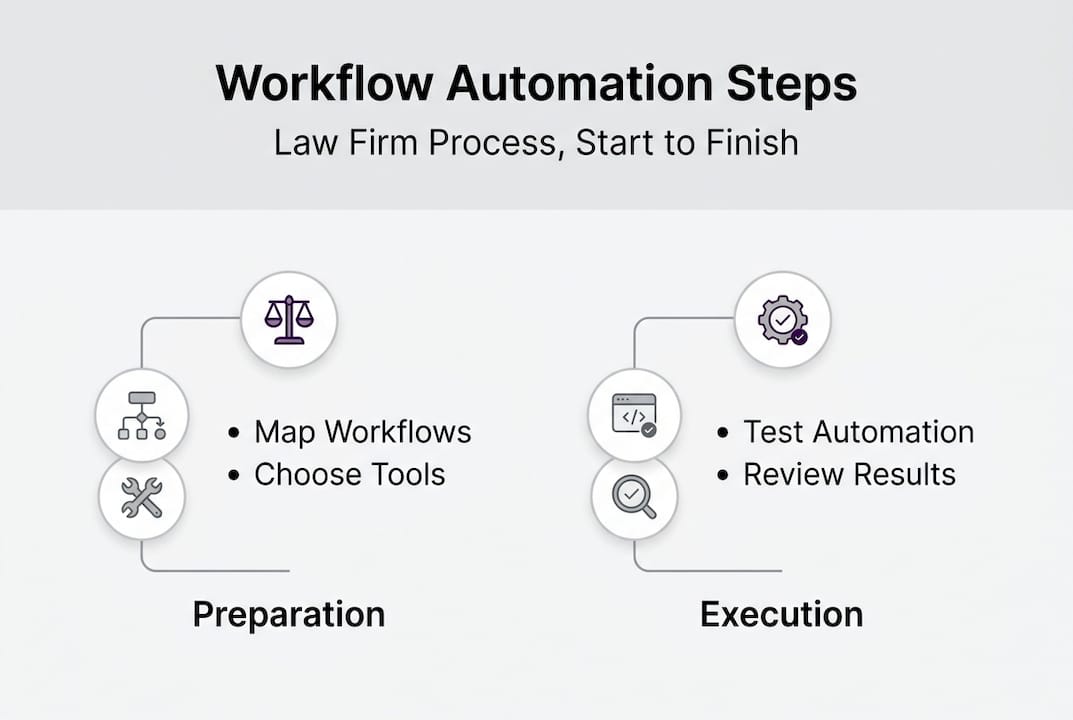
- Step-by-step: How to automate a legal workflow
- Verifying results and avoiding common pitfalls
- The uncomfortable truth about legal workflow automation
- Scale your law firm with secure workflow automation
- Frequently asked questions
Key Takeaways
| Point | Details |
|---|---|
| Boost efficiency | Law firm workflow automation significantly reduces non-billable hours and repetitive manual work. |
| Prioritize preparation | Success depends on choosing the right tools, ensuring clean data, and securing team alignment. |
| Keep humans in the loop | Critical oversight is required to prevent AI errors and meet compliance demands. |
| Measure and improve | Tracking results and iterating on processes ensures sustainable long-term benefits. |
Why automate workflows in law firms?
Law firms run on precision and timing. Yet many still rely on manual steps for tasks that repeat daily. Document handling, deadline tracking, client intake, and billing coordination all consume significant attorney and staff time. These are exactly the areas where automation delivers the most immediate value.
Common workflow pain points in legal practice include:
- Document preparation and review: Drafting standard agreements, NDAs, and client letters by hand introduces inconsistency and delays.
- Deadline and calendar management: Manually tracking court dates, filing deadlines, and statute of limitations across multiple cases creates risk.
- Client communication: Sending status updates, intake forms, and follow-up reminders manually is time-consuming and error-prone.
- Billing and time entry: Delayed or inaccurate time tracking leads to revenue leakage and billing disputes.
The benefits of fixing these problems are well documented. 93% of firms reduce non-billable time with workflow automation, freeing attorneys to focus on work that actually generates revenue. Efficiency gains, fewer errors, and lower administrative costs follow naturally.
“Workflow automation is not just a productivity tool. It is a structural shift in how legal work gets organized and delivered.”
That said, resistance is real. Many firms worry about legacy system compatibility, data security, and whether AI can be trusted with sensitive legal matters. These concerns are valid. Automation does not eliminate risk. It shifts where the risk lives, and that requires thoughtful design.
Exploring legal digital collaboration models can help firms understand how AI fits alongside existing team structures. For a broader view of what is possible, improving business workflows with agentic AI goes well beyond simple task automation.
| Pain point | Manual approach | Automated approach |
|---|---|---|
| Document drafting | Attorney drafts each version | Template engine generates drafts |
| Deadline tracking | Spreadsheet or calendar entry | Automated alerts and reminders |
| Client intake | Paper forms and email | Digital intake with auto-routing |
| Billing entry | Manual time logs | AI-assisted time capture |
The business case is clear. The question is how to build it correctly.
What you need to get started: Tools, requirements, and preparation
Understanding the benefits, the next step is preparation. Here’s what you’ll need before beginning your automation journey.
Before configuring a single workflow, you need the right foundation. Jumping straight to software selection without addressing data quality and team readiness is one of the most common mistakes firms make.
Essential tools and platforms for legal workflow automation:
- Document automation: Tools like HotDocs or Contract Express generate standard legal documents from templates.
- Case management systems: Platforms such as Clio, MyCase, or PracticePanther centralize matter tracking and task assignment.
- Scheduling and calendar tools: Automated scheduling reduces back-and-forth with clients and coordinates internal meetings.
- E-discovery platforms: AI-assisted review tools accelerate document review in litigation matters.
- Agentic AI platforms: Systems that reason across multiple steps and coordinate between tools, not just trigger single actions.
Pro Tip: Before selecting any platform, map your three most repetitive workflows on paper. This forces clarity on what you actually need the technology to do, not just what the vendor promises.
Integration issues with legacy systems and poor data quality are among the most common reasons automation projects stall or fail. Clean, well-structured data is not optional. It is the prerequisite.
| Factor | Cloud-based solution | On-premises solution |
|---|---|---|
| Setup time | Fast, often days | Weeks to months |
| Cost model | Subscription | Upfront capital investment |
| Maintenance | Vendor managed | Internal IT required |
| Security control | Shared responsibility | Full internal control |
| Scalability | High | Limited by hardware |
Change management is just as important as the technology itself. Staff who do not understand why a process is changing will work around it. Invest time in process mapping sessions with your team before rollout. Identify who owns each workflow step and who needs to approve exceptions. For a practical list of AI tasks for law firms that are ready to automate today, reviewing proven use cases can shortcut your planning process significantly.

Step-by-step: How to automate a legal workflow
Armed with the right tools and preparation, it’s time for execution. Follow these steps to automate a legal workflow.
We’ll use client onboarding as the example. It is a high-volume, repeatable process that most firms handle manually and one where errors create downstream problems.
- Map the current process. Write out every step from first client contact to matter opening. Include who does each step, what systems they use, and where delays typically occur.
- Identify automation candidates. Flag steps that are repetitive, rule-based, and do not require attorney judgment. Sending intake forms, collecting signatures, and creating matter records are strong candidates.
- Select your technology stack. Choose tools that integrate with your existing case management system. Avoid building automation on top of disconnected platforms.
- Configure the workflow. Set up triggers, conditions, and actions. For example: when a signed engagement letter is received, automatically create a matter record, assign a paralegal, and send a welcome email.
- Set up RAG (retrieval-augmented generation) where applicable. RAG allows AI to pull from your firm’s own documents and precedents rather than generating answers from scratch, reducing the risk of inaccurate outputs.
- Build in audit trails. Every automated action should be logged with a timestamp, the data used, and the outcome. This is non-negotiable for compliance and malpractice defense.
- Run a pilot with real cases. Test with a small set of actual matters before full rollout. Measure accuracy, time saved, and any exceptions the system cannot handle.
- Keep human review in the loop. AI limitations such as hallucinations or overconfidence make attorney sign-off essential for any output that affects client rights or obligations.
Stat to know: Firms that include structured human checkpoints in automated workflows report significantly higher compliance adherence and fewer error-related incidents than those that fully remove human review.
For firms building their first automated process, AI-driven office automation frameworks provide a proven structure. If compliance is a primary concern, the AI compliance automation tutorial covers how to design oversight into every step.
Verifying results and avoiding common pitfalls
After automation setup, verifying its real-world impact and sidestepping missteps ensures continued trust and ROI.
Deployment is not the finish line. Automation that is not monitored degrades over time as processes change, data quality shifts, and edge cases accumulate.
Common failure points to watch for:
- Bad input data: Automation amplifies whatever data quality problems already exist. Garbage in, garbage out applies directly here.
- Workflow gaps: Automated steps that hand off to manual steps without clear ownership create bottlenecks that are worse than the original process.
- Missing human checkpoints: Removing attorney review entirely from high-stakes steps creates liability exposure.
- Low user adoption: If staff find workarounds, the automation is not actually running your process.
Metrics that matter:
- Time saved per workflow cycle
- Error rate before and after automation
- User adoption rate among staff
- Compliance adherence rate
- Client satisfaction scores on onboarding or communication
Regulatory compliance requires near-zero errors, and skepticism around AI handling fiduciary tasks is well founded. Build your verification process with that standard in mind.
| Audit method | What it checks | Frequency |
|---|---|---|
| Workflow log review | Accuracy of automated actions | Weekly |
| Exception rate tracking | Steps requiring human override | Monthly |
| Compliance spot checks | Adherence to regulatory standards | Quarterly |
| User feedback surveys | Adoption and usability issues | Quarterly |
For firms looking to align automation with regulatory standards, AI compliance best practices and securing AI for compliance provide detailed guidance on building systems that hold up under scrutiny.
“Continuous improvement is not a phase. It is the operating model for any automation program that intends to stay reliable.”
Establish a feedback loop where staff can flag automation errors or gaps in real time. Review those flags monthly and update workflows accordingly. This keeps your automation aligned with how your practice actually operates.
The uncomfortable truth about legal workflow automation
Having examined implementation and oversight, let’s step back for a candid look at what technology can and cannot do for legal workflows.
Most firms come to automation expecting it to solve their capacity problem. Some of it does. But the honest reality is that automation shifts the nature of the work, not the volume of judgment required. AI can draft a contract, but it cannot weigh the strategic risk of a specific clause for a specific client relationship. It can flag a deadline, but it cannot decide whether to seek an extension.
The firms that get the most from automation are the ones that treat it as infrastructure, not a replacement for expertise. They automate the repeatable, and they protect the irreplaceable. AI risk and trust concerns are not obstacles to work around. They are signals about where human judgment still belongs.
Over-automating fiduciary and compliance-sensitive tasks without robust oversight does not save time in the long run. It creates liability. Sustainable automation means knowing exactly where the line is.
Scale your law firm with secure workflow automation
If your firm is ready to adopt these automation advantages, here’s how you can take the next step with guided support.
Ailerons.ai designs and deploys agentic AI systems built specifically for the operational realities of professional service firms. From document management to compliance-driven workflows, our systems are built to integrate with your existing platforms and keep human oversight exactly where it belongs. Explore AI case studies for law firms to see how firms like yours have reduced administrative load and improved accuracy. When you’re ready to build a strategy tailored to your practice, managed AI consulting connects you with experts who understand both the technology and the legal environment it operates in.
Frequently asked questions
What is workflow automation for law firms?
Workflow automation in law firms uses technology to streamline processes, reduce manual work, and ensure consistent service delivery. Efficiency and ROI increase measurably when repetitive administrative tasks are handled by automated systems rather than staff.
Which workflows are best to automate in a law firm?
Start with repetitive admin tasks like document drafting, client onboarding, and case status tracking, as these yield the highest efficiency gains. 93% of firms reduce non-billable time when they begin with these high-volume, rule-based processes.
What are common pitfalls with legal workflow automation?
Firms commonly face poor data quality, resistance to change, and AI errors, making human oversight essential for compliance and reliability. Human oversight is critical wherever AI limitations or data risks could affect client outcomes.
How does automation impact regulatory compliance in law firms?
Automation supports compliance, but regulatory tasks need near-zero error rates and robust human verification to avoid trust and liability risks. Regulatory compliance demands a level of accuracy that requires human sign-off at every critical decision point.
Recommended
- Step-by-Step Guide to AI-Driven Office Automation Success | Ailerons IT Consulting
- Step by Step Business Automation Guide for SMBs | Ailerons IT Consulting
- Process Automation Tutorial for Agentic AI in Compliance Workflows | Ailerons IT Consulting
- Improving Business Workflows with AI: Achieve Automation | Ailerons IT Consulting
- Workflow Automation Examples for Project Managers 2026 | Teambuilt Blog