

TL;DR:
- Companies with agentic AI see up to 30% operational cost reductions and 150% ROI in the first year.
- Traditional automation struggles with exceptions, rigidity, silos, and requires manual reconfiguration.
- Successful upgrades involve process cleanup, stakeholder buy-in, focused pilots, and iterative refinement.
Most business leaders assume automation delivers modest, incremental improvements. That assumption is wrong. Companies that upgrade to intelligent office automation with agentic AI are seeing 30% operational cost reductions, a 150% median ROI in the first year for finance processes, and 15 to 25 hours per employee per week reclaimed from repetitive work. These are not projections from pilot programs. They are real outcomes from mid-sized companies that made the shift. This article breaks down why traditional automation holds organizations back, what the numbers actually look like, and how to build a practical roadmap for upgrading your office operations with agentic AI.
Table of Contents
- Why the status quo holds companies back
- The true business case: ROI, cost reduction, and reclaimed time
- Agentic AI vs. traditional automation: What’s different?
- Building the intelligent automation roadmap: Key steps for leaders
- Why most automation upgrades under-deliver (and how to get it right)
- Ready to upgrade? Learn from real-world success
- Frequently asked questions
Key Takeaways
| Point | Details |
|---|---|
| Massive efficiency gains | Upgrading to intelligent office automation can cut operational costs by 30 percent and save as much as 25 hours per employee each week. |
| Strong ROI | Most companies realize at least 150 percent ROI in the first year after modernizing with agentic AI. |
| Agentic AI advantage | Switching from traditional automation to agentic AI unlocks new autonomous capabilities and workflow improvements. |
| Roadmap for leaders | A clear five-step plan enables business leaders to upgrade automation without disruption or wasted investment. |
Why the status quo holds companies back
Traditional office automation was built around fixed rules. A workflow runs if a specific trigger fires. A document routes to the next person based on a predefined path. If something unexpected happens, the process stalls and a human has to step in. That model worked well enough when business operations were simpler. It does not hold up well today.
Most mid-sized companies are running a patchwork of older automation tools layered on top of each other. There is usually a CRM with some basic workflow rules, an accounting system with limited integration, and a set of manual handoffs in between. The result is a system that looks automated on paper but still requires significant human effort to keep moving.
Common signs that your current automation is falling short:
- Employees spend large portions of their day on data entry, status updates, and routing tasks between systems
- Approvals and exceptions pile up because no one built logic to handle edge cases
- Information sits in silos across platforms, requiring manual reconciliation
- Reports and summaries require someone to pull data from multiple sources by hand
- New process requirements mean custom coding or consultant time rather than simple configuration
These are not just inconveniences. They represent real operational drag that compounds across your workforce every day.
Mid-sized companies lose 15 to 25 hours per employee per week to repetitive tasks without modern automation.
That number is striking. For a company with 100 employees, that is up to 2,500 hours per week being absorbed by work that an intelligent system could handle. The cost implications are significant. But the strategic cost is even larger. When your best people are tied up in administrative work, they are not focused on improving business workflows or higher-value priorities.
Legacy systems also struggle to adapt. When your business changes, these tools require manual reconfiguration. They do not learn. They do not adjust. They execute the same script regardless of context, and that rigidity creates friction at every level of your operations.

The true business case: ROI, cost reduction, and reclaimed time
Numbers matter when you are making the case for a technology investment. Here is what the research actually shows.
| Metric | Before upgrade | After upgrade |
|---|---|---|
| Operational costs | Baseline | Up to 30% reduction |
| Employee time on repetitive tasks | 15 to 25 hrs/week | Significantly reduced |
| Finance process ROI (Year 1) | Baseline | 150% median ROI |
| Productivity improvement | Baseline | 41% improvement reported |
| 3-year NPV (Microsoft 365 Copilot case) | N/A | $19.7M |
These figures come from real deployments. Finance processes deliver 150% median ROI in year one. That is not a speculative projection. And the Forrester TEI study on Microsoft 365 Copilot found a 116% ROI over three years, a 41% productivity improvement, and a net present value of $19.7 million across the study organizations.
Here is how these benefits typically accrue in practice:
- Cost reduction kicks in first as manual processes are automated and headcount requirements for routine work stabilize.
- Time reclaimed follows quickly as employees stop performing repetitive data tasks and routing work.
- Error reduction improves accuracy across billing, compliance, and reporting functions.
- Faster cycle times allow finance, operations, and admin teams to close work faster with fewer handoffs.
- New capabilities become available as AI handles routine tasks and frees teams for strategic work.
When you are cutting admin overhead across departments, the savings add up fast. But the productivity story is equally important for long-term value.
Pro Tip: When building your internal business case, frame ROI in two buckets: hard savings (reduced labor costs, fewer errors, faster cycle times) and soft gains (time freed for strategic work, improved employee satisfaction, faster onboarding). Stakeholders respond better when both dimensions are visible.
To boost efficiency with agentic AI, you need to connect these numbers directly to your current operating costs. Pull your actual labor hours spent on manual processes, apply a realistic automation rate, and the ROI case usually becomes clear very quickly.
Agentic AI vs. traditional automation: What’s different?
Agentic AI is a class of AI system that can interpret context, set goals, plan steps, and take action across multiple platforms without requiring a human to direct each move. It is not a chatbot. It is not a simple workflow trigger. It is an autonomous system that can reason about a task and complete it end to end.
Here is how it compares to traditional automation approaches like RPA (robotic process automation) and rule-based workflow tools:
| Capability | Traditional automation | Agentic AI |
|---|---|---|
| Handles exceptions | No, requires human | Yes, with decision logic |
| Adapts to change | Requires reconfiguration | Learns and adjusts |
| Operates across platforms | Limited, point-to-point | Broad, native integration |
| Understands context | No | Yes |
| Initiates actions autonomously | No | Yes |
| Escalates when needed | Manual only | Automatic with criteria |
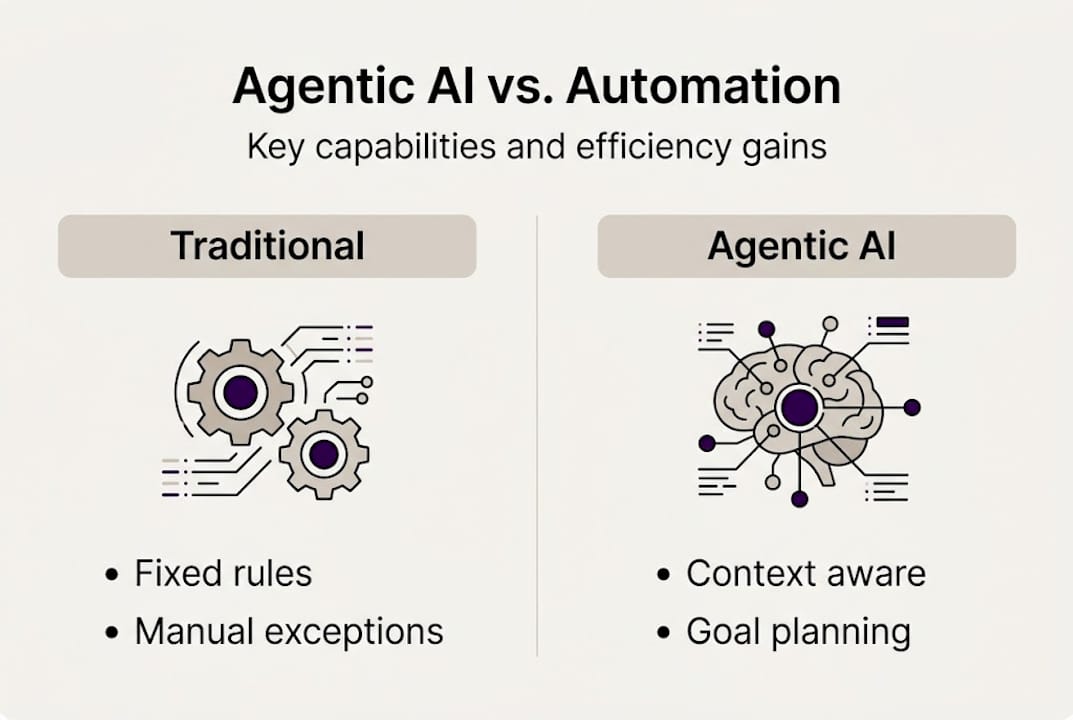
The practical difference shows up in daily operations. Traditional automation can move a form from Point A to Point B. Agentic AI can review the form, check it against prior records, flag discrepancies, request clarification from the right person, and update the relevant systems once resolved. All without a human initiating each step.
Capabilities that agentic AI unlocks for operations teams:
- Automatic escalation when thresholds are crossed or approvals stall
- Context-aware routing that adapts to the nature of a request, not just its source
- Cross-system coordination across CRM, ERP, document platforms, and scheduling tools
- Human-in-the-loop collaboration where AI handles routine steps and flags complex decisions
- Audit trails and compliance tracking built into every process
The shift from agentic AI automation trends to actual deployment is happening faster than most leaders realize. Reviewing AI trends in office operations confirms that agentic AI eliminates repetitive tasks and redirects employee effort toward work that actually requires human judgment.
Building the intelligent automation roadmap: Key steps for leaders
Knowing the benefits is one thing. Moving from insight to action is another. Here is a practical five-step roadmap for leaders at mid-sized companies ready to upgrade.
- Assess your current workflows. Map the processes where your team spends the most time on manual, repetitive work. Quantify hours lost and error rates. This becomes your baseline for measuring improvement.
- Build internal buy-in. Bring your finance, operations, and IT leads into the conversation early. Present the ROI data. Connect the upgrade to goals that already matter to each group.
- Select the right technology. Not all automation platforms are equal. Look for agentic AI systems with strong integration capabilities, clear compliance frameworks, and the ability to handle exceptions without constant human input.
- Run a focused pilot. Choose one or two high-impact processes for your first deployment. A billing workflow, an approval chain, or a document routing process are good starting points. Measure results tightly.
- Measure, refine, and scale. Use the pilot data to refine your approach, then expand to additional workflows. Benchmarks and case studies confirm that organizations see rapid ROI when automation planning is thoughtful and data-driven.
Pro Tip: Do not automate a broken process. If a workflow is chaotic or poorly defined, automating it will just make the chaos faster. Clean up the process logic first, then apply automation. This single step separates successful upgrades from expensive disappointments.
Change management matters here. Staff need to understand what the AI system does, what it does not do, and where human judgment still applies. Use a step-by-step automation guide to structure your rollout and consider context-aware automation strategies to make sure your deployment adapts to real-world workflow variation.
Why most automation upgrades under-deliver (and how to get it right)
Most automation projects that disappoint have one thing in common: they treated the technology as the solution rather than the enabler. Leaders got excited about a platform, pushed for rapid deployment, and skipped the harder work of clarifying how their processes actually function and where real friction lives.
Here is the uncomfortable truth. A sophisticated AI system deployed on top of unclear processes will produce unclear results faster. The tool amplifies what is already there. If your workflows are well-defined and your teams understand their role in the new system, the returns are substantial. If not, you will spend months troubleshooting edge cases that should have been resolved before deployment.
The organizations that get it right do three things differently. They involve end users in the design process from the start, not as an afterthought. They set up measurement frameworks before go-live, so they know what success looks like. And they treat the first deployment as a learning loop, not a final answer.
Tracking AI trends for operations leaders shows that the gap between high-performing and low-performing automation adopters is almost never the technology itself. It is process clarity, stakeholder alignment, and willingness to iterate. Get those right, and the technology delivers exactly what the data promises.
Ready to upgrade? Learn from real-world success
If the data in this article reflects where you want your organization to be, the next step is understanding how these outcomes were achieved in practice. Real-world results depend on getting the design, integration, and change management right from the beginning.
Explore office automation case studies to see how organizations like yours have moved from manual, fragmented operations to intelligent, automated workflows with measurable returns. When you are ready to assess your own environment and build a deployment plan, the team at Ailerons AI can help you move from insight to execution with confidence.
Frequently asked questions
What is agentic AI and how does it improve office automation?
Agentic AI refers to systems that interpret context, make autonomous decisions, and adapt to workflow needs without human direction at each step. Unlike traditional automation, it reduces manual handoffs and saves 15 to 25 hours per employee per week by managing multi-step tasks end to end.
How fast can businesses see ROI from intelligent automation upgrades?
Most organizations see results within months of deployment. Finance processes specifically deliver a 150% median ROI in the first year, with operational cost reductions and time savings typically visible before year-end.
What are the main risks if companies delay upgrading their office automation?
Delaying means continuing to absorb the cost of repetitive manual work, which research shows consumes 15 to 25 hours per employee per week. The strategic risk grows as competitors leverage AI to operate faster and at lower cost.
How does intelligent automation support finance and operations teams?
Finance and operations teams benefit from fewer manual errors, faster approval cycles, and significant time reclaimed for analysis. Finance processes see 150% ROI and measurable efficiency gains within the first year of a well-planned upgrade.
Recommended
- Office Operations Automation Trends: Agentic AI Impact | Ailerons IT Consulting
- Step-by-Step Guide to AI-Driven Office Automation Success | Ailerons IT Consulting
- AI-driven operations guide: boost efficiency 72% in 2026 | Ailerons IT Consulting
- AI Trends in 2026: Transforming Office Operations | Ailerons IT Consulting
- 7 meilleures pratiques gestion de parc pour optimiser vos actifs