

TL;DR:
- Manual processes consume significant team time, but automation can recover 15 to 20 hours weekly.
- Start with small, targeted workflows and build through pilot projects to ensure success.
- Partner with experts to effectively integrate and optimize agentic AI systems in office workflows.
Manual processes still consume a significant portion of your team’s workday, even inside organizations that have invested in modern software. Scheduling conflicts, document handoffs, approval queues, and data re-entry stack up across departments, quietly eroding productivity and morale. The good news is that structured workflow automation, particularly with agentic AI at the core, offers a practical path forward. Operations teams that execute this correctly can recover 15 to 20 hours per week in the very first month. This guide walks you through each step, from initial assessment to ongoing optimization, so your organization can reduce friction and get more done without adding headcount.
Table of Contents
- Understanding automation in today’s office
- Preparation: Assessing workflows and readiness
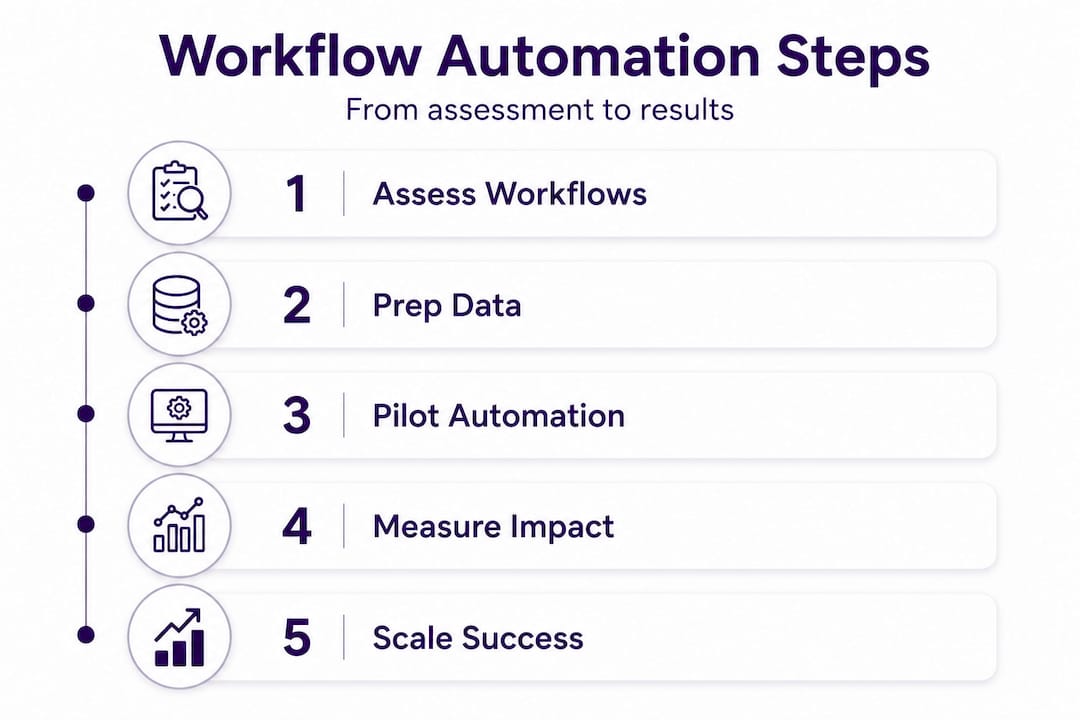
- Step-by-step office workflow automation process
- Measuring impact and optimizing results
- Why starting small beats the ‘big bang’ in automation
- Partner with experts for seamless office automation
- Frequently asked questions
Key Takeaways
| Point | Details |
|---|---|
| Start with targeted pilots | Launching with small, impact-focused automation pilots reduces risk and maximizes learning. |
| Agentic AI adapts workflows | Modern AI solutions adapt to changing needs but require careful governance and staged rollouts. |
| Measure impact early | Track hours saved and efficiency gains from the outset to refine and justify the automation process. |
| Iterate and optimize | Continual feedback, analytics, and incremental scaling lead to the highest long-term value. |
Understanding automation in today’s office
Workflow automation is not a single technology. It spans a spectrum, from simple rule-based triggers to fully autonomous, reasoning-capable AI systems. Understanding where you sit on that spectrum helps you make realistic decisions about what to deploy and when.
Rule-based automation executes fixed instructions. If a form is submitted, send an email. If an invoice matches a purchase order, approve it. These systems are reliable and predictable. They scale well. The limitation is rigidity. Any exception or variation outside the predefined rules either fails silently or requires manual intervention.
Agentic AI automation, by contrast, reasons through context, plans across multiple steps, and adjusts when conditions change. An agentic system can process an invoice, detect a discrepancy, cross-reference the vendor’s historical records, draft a clarification email, and queue the item for human review, all without a human directing each action. You can explore AI automation types in detail to see where each approach fits your operations.
Here is a side-by-side comparison to orient your decision-making:
| Feature | Rule-based automation | Agentic AI automation |
|---|---|---|
| Handles exceptions | No | Yes |
| Requires predefined logic | Yes | No |
| Adapts to new inputs | No | Yes |
| Implementation complexity | Low to medium | Medium to high |
| Best for | Stable, repetitive tasks | Variable, multi-step workflows |
| Typical ROI timeline | 1 to 3 months | 2 to 6 months |
The broader agentic AI trends in 2026 confirm that demand is growing. However, the adoption rate remains lower than most assume. Fewer than 15% of firms have activated agentic automation at scale, largely due to ROI uncertainty and governance challenges. That gap presents an opportunity for mid-sized organizations willing to move methodically. A real agentic AI case study from a similar-sized company illustrates how structured deployment delivers measurable gains without overreach.
Key things to understand before you start:
- Automation is not an all-or-nothing decision. You can automate one process while leaving others manual.
- Most organizations benefit from automating administrative tasks before customer-facing workflows.
- Staff adoption depends on clear communication about what automation handles and what it does not.
Preparation: Assessing workflows and readiness
Before writing a single prompt or configuring a single integration, you need an accurate picture of how work actually flows through your organization. Most teams underestimate how much time this phase takes, and overestimate how well they know their own processes.
Start by mapping your most common workflows. Walk through each process step by step, from trigger to completion. Document who does what, what data they use, and where handoffs occur. Pay particular attention to tasks that meet these criteria:
- High frequency: Happens daily or weekly, not just once a month.
- Low variability: Follows a predictable path most of the time.
- Data-dependent: Pulls from or pushes to a system (CRM, ERP, accounting platform).
- Prone to delays: Often waits on a person to take a simple action.
- Error-generating: Produces mistakes due to manual entry or inconsistency.
Here is a quick-reference table to help you prioritize which workflows to target first:
| Workflow type | Frequency | Automation fit | Priority level |
|---|---|---|---|
| Invoice processing | Daily | High | High |
| Appointment scheduling | Daily | High | High |
| Report generation | Weekly | High | High |
| Vendor onboarding | Monthly | Medium | Medium |
| Contract review | Monthly | Medium | Medium |
| Strategic planning | Quarterly | Low | Low |
Beyond the process map, assess your data and system readiness. Automation requires clean, structured data. If your CRM has duplicate records or your ERP has inconsistent formats, fix that first. Integration capability matters too. Check whether your existing platforms support APIs or pre-built connectors.

On the people side, identify an internal champion in each department where you plan to automate. This person does not need technical skills. They need credibility with their colleagues and a willingness to flag problems honestly during testing.
Experts consistently advise organizations to start with embedded helpers before deploying full agentic systems. These are smaller, focused AI assistants that handle narrow tasks inside existing workflows, building trust and generating early data before broader rollout. The workflow automation tips and AI process automation tutorial on our blog walk through specific examples of how to apply this model in compliance-sensitive environments.
Pro Tip: Create a simple “automation candidate” spreadsheet. List every repetitive task your team handles each week. Add columns for frequency, estimated time cost, and error rate. Sort by total time cost. The top five items on that list are your pilot targets.
Step-by-step office workflow automation process
Once preparation is complete, execution follows a clear sequence. Rushing any phase creates downstream problems that are harder to fix after deployment than before.
-
Document the target workflow in full detail. Write out every step, every decision point, and every system involved. Include exception cases. If you cannot write it down clearly, you are not ready to automate it.
-
Define your success metrics before you build anything. Decide what “better” looks like. Track hours saved per week, error rate reduction, process completion time, and escalation frequency. These baselines are critical for measuring impact later.
-
Select the right automation layer for each task. Use rule-based tools for linear, exception-free tasks. Reserve agentic AI for workflows that involve variability, multi-system coordination, or judgment-based routing.
-
Configure and test in a sandbox environment. Never deploy directly into production. Run the automation against historical data or simulated inputs. Verify that outputs match expectations across both standard and edge cases.
-
Conduct a limited pilot with real users. Choose one team or one department. Run the automated workflow alongside the manual process for two weeks. Compare results side by side, and collect structured feedback from staff.
-
Review pilot data and refine. Look at where the automation performed as expected and where it produced errors or required human override. Adjust logic, thresholds, or escalation rules accordingly.
-
Expand incrementally. Add one department or workflow at a time. Avoid simultaneous rollout across the organization. Staged expansion lets you catch issues before they affect the entire operation.
-
Train staff on the new workflow. Focus on what changed, what they are responsible for, and how to handle exceptions. Keep training concise and role-specific.
“The organizations that get the most from automation are those that treat the first deployment as a learning event, not a finish line.” This is the core logic behind the pilot-expand-optimize model that leading advisors recommend over big-bang rollouts.
Common mistakes to avoid during execution:
- Skipping staff input: People doing the work know where the exceptions are. Exclude them, and your automation will break on the first real edge case.
- Automating broken processes: Automation speeds up whatever it touches, including inefficient steps. Fix the process logic before you automate it.
- Measuring only once: Automation performance can drift. Monitor continuously, not just at launch.
The workflow automation step-by-step guide and business automation guide offer additional tactical detail for each of these phases, including integration-specific guidance for common platforms.
Pro Tip: Use a simple scorecard for your pilot. Rate each automated task on three criteria: accuracy (did it produce the right output?), speed (was it faster than manual?), and staff acceptance (do people trust it?). Any task scoring low in two or three areas needs rework before expansion.
Operations teams using this approach consistently recover 15 to 20 hours per week within the first month of productive deployment, particularly in invoice processing, scheduling, and document routing.
Measuring impact and optimizing results
Automation without measurement is just change. You need structured tracking to confirm that the investment is delivering value and to identify where to expand next.
Start with the metrics you defined before the pilot. Compare current performance against your baseline:
- Hours recovered: Track total staff time redirected from manual tasks to higher-value work.
- Error rate: Compare exception frequency before and after automation. A 30 to 50% reduction in the first month is a realistic target for well-scoped workflows.
- Process cycle time: Measure how long it takes to complete a workflow from start to finish. Automation typically cuts cycle time by 40 to 70% for administrative tasks.
- Escalation frequency: Count how often the automated system routes a task to human review. High escalation rates signal that the automation logic needs refinement.
- User satisfaction: Survey the staff interacting with the system. Their feedback surfaces issues that metrics alone may miss.
Use your pilot learnings to refine automation logic and expand scope. Each iteration of the pilot-expand-optimize cycle generates data that makes the next deployment faster and more accurate. This is why incremental rollout compounds over time. Early pilots feel slow, but they build institutional knowledge that accelerates every subsequent deployment.
| Metric | Month 1 target | Month 3 target | Month 6 target |
|---|---|---|---|
| Hours recovered per week | 15 to 20 hours | 30 to 40 hours | 50 to 80 hours |
| Error rate reduction | 30 to 50% | 50 to 70% | 60 to 80% |
| Cycle time improvement | 40% | 55% | 70% |
| Staff adoption rate | 60% | 80% | 90%+ |
The office automation ROI breakdown and the boost operations efficiency guide both provide deeper frameworks for calculating and communicating return on investment to leadership. ROI reporting is often what determines whether automation initiatives receive continued budget and organizational support.
Operations leaders who recover 15 to 20 hours per week in month one should document exactly where those hours came from. That data directly informs the next round of automation targeting.
Why starting small beats the ‘big bang’ in automation
Most leadership teams, when they finally commit to automation, want results fast and at scale. That instinct is understandable but consistently counterproductive. The organizations that get the most from automation are almost always the ones that started narrowest.
Here is the uncomfortable reality: a big-bang rollout does not reduce risk. It amplifies it. When you automate ten workflows simultaneously, you have no clean way to isolate which one caused a specific problem. Staff confusion multiplies. Exceptions pile up without clear ownership. The automation project begins to feel like a disruption rather than an improvement.
Starting small does something more valuable than limiting downside. It generates real operational data from your specific environment, with your specific data quality, your specific staff behaviors, and your specific exception patterns. No vendor demo, no industry benchmark, and no consultant projection can replicate that.
The agentic automation reality for most mid-sized firms in 2026 is that the technology is capable of far more than organizations are prepared to deploy responsibly. The constraint is rarely the AI. It is the readiness of the surrounding systems, the data, and the people.
Experts recommend that organizations start with embedded helpers before activating full agentic systems. This is not about caution for its own sake. It is about building the internal competency and confidence that makes larger deployments succeed. Teams that skip this step tend to stall at mid-scale because they lack the diagnostic fluency to troubleshoot effectively.
The firms that are quietly achieving the most durable automation outcomes right now are not the ones with the most sophisticated tools. They are the ones that treat each pilot as a learning asset and use it deliberately. One workflow, done well, teaches you more than ten workflows done hastily.
Partner with experts for seamless office automation
Navigating the full automation journey, from workflow assessment through agentic AI deployment and ongoing optimization, requires both technical depth and operational experience. Doing this in-house without specialized knowledge often results in slower timelines and costly rework. External expertise helps you avoid the common pitfalls covered in this guide while accelerating time to value.
Ailerons.ai works with operations and IT teams at mid-sized organizations to design and deploy agentic AI systems that fit your existing stack, including CRM, ERP, scheduling, document management, and accounting platforms. Our automation case studies show how organizations in comparable environments achieved measurable efficiency gains through structured, pilot-first implementation. Whether you are just beginning your assessment or ready to scale an existing pilot, our IT and AI consulting services provide the architecture, integration support, and ongoing optimization your team needs to make automation work reliably, not just in theory.
Frequently asked questions
What is the first step to automate office workflows?
The first step is to audit your current processes and identify repetitive, high-impact tasks that are strong candidates for automation. Industry guidance consistently recommends starting with focused helpers in targeted areas before moving to full agentic deployment.
How quickly can we see results from workflow automation?
Results can come faster than most teams expect. Operations teams using agentic AI-driven automation recover 15 to 20 hours per week within the first month of active deployment in well-scoped workflows.
Is agentic AI suitable for all types of office work?
Not every task is a fit for agentic AI. Starting with embedded, task-specific AI helpers in targeted scenarios is the recommended approach for most companies, particularly given that fewer than 15% of firms have successfully activated full agentic automation due to ROI and governance complexity.
What are common pitfalls in office workflow automation?
Skipping input from the staff who actually do the work and attempting a full organization-wide rollout at once are the two most damaging mistakes. A staged, pilot-expand-optimize approach consistently outperforms big-bang deployments in both reliability and staff adoption.
Recommended
- Step-by-Step Guide to AI-Driven Office Automation Success | Ailerons IT Consulting
- Step-by-step workflow automation guide for business leaders | Ailerons IT Consulting
- Improving Business Workflows with AI: Achieve Automation | Ailerons IT Consulting
- Streamline billing with workflow automation: A practical guide | Ailerons IT Consulting
- Kako avtomatizirati poslovne procese z AI: vodič 2026 - ChatTrips
- Workflow automation tips: boost SaaS team efficiency fast | Rule27 Design