

Legal operations teams face relentless pressure to cut costs, reduce errors, and deliver faster results with the same or fewer resources. 66% of legal ops professionals now rank process automation as a top strategic priority, which signals a clear shift in how firms compete. This guide walks you through what automation actually means for legal ops, how to prepare your team, how to execute a rollout step by step, and how to measure whether it is working. Whether you are just starting or scaling an existing program, the practical frameworks here will help you move faster and with more confidence.
Table of Contents
- What process automation means for legal operations
- Assessing your needs: Pre-automation checklist
- Step-by-step guide to process automation in legal ops
- Avoiding common pitfalls and maximizing ROI
- Measuring success: Outcomes and verification in legal automation
- A contrarian view: Why ‘just automate everything’ backfires in legal ops
- Ready to future-proof your legal operations?
- Frequently asked questions
Key Takeaways
| Point | Details |
|---|---|
| Prioritize for impact | Focus automation on repetitive, rules-driven legal processes for rapid results. |
| Preparation is key | Assess processes, clarify roles, and re-engineer workflows before automating. |
| Pilot, measure, refine | Start small, verify impact, and scale automation with lessons learned. |
| Avoid common pitfalls | Invest in change management and ongoing training to ensure success. |
| Value over volume | More automation isn’t always better; strategic selection yields the best ROI. |
What process automation means for legal operations
Process automation in legal ops means replacing manual, repetitive steps with software or AI systems that execute those steps consistently, on schedule, and without human intervention for each task. This is different from simply digitizing paperwork. True automation connects systems, enforces rules, routes approvals, and generates audit trails automatically.
The processes most suited to automation in legal departments include contract intake and routing, matter management updates, invoice review and approval, compliance deadline tracking, and document generation. These tasks share a common trait: they follow defined rules and repeat frequently.
The business case is straightforward. Automation reduces labor costs by eliminating low-value manual work. It minimizes risk by enforcing consistent process steps every time. It accelerates turnaround because tasks do not sit in someone’s inbox waiting. And it creates auditability because every action is logged.
Learning more about AI in business process management helps clarify how these systems fit into a broader operational strategy. 66% of legal ops leaders now list automation as a top strategic priority, which means your competitors are already moving.
| Task | Human-driven approach | Automated approach |
|---|---|---|
| Contract routing | Email to attorney, manual follow-up | Auto-assigned by type, deadline tracked |
| Invoice approval | Spreadsheet review, manual sign-off | Rules-based review, auto-escalation |
| Compliance tracking | Calendar reminders, manual updates | System alerts, auto-logged actions |
| Document generation | Template copy-paste, manual edits | Auto-populated from matter data |
Key benefits legal ops teams report after automation:
- Faster cycle times on contracts and approvals
- Lower error rates in invoice processing and compliance filings
- Reduced overhead from administrative and coordination tasks
- Stronger audit trails for regulatory and internal review
Assessing your needs: Pre-automation checklist
Understanding the concept is essential, but effective automation starts with careful preparation. Jumping straight to technology without this groundwork is one of the most common reasons automation projects fail to deliver.
Start by identifying which processes drain the most time and carry the highest error risk. Interview the people doing the work. Look at where tasks stall, where mistakes happen repeatedly, and where staff spend hours on steps that add no judgment or creativity.

36% of firms are actively reengineering processes before automating them. That number reflects a hard lesson: automating a broken process just produces broken results faster. Fix the process first, then automate it.
Reviewing compliance automation prep and AI business workflow automation resources can help you structure this assessment phase properly.
Pre-automation checklist:
- Map the current process end to end, including every handoff and exception
- Identify data sources and confirm they are clean, structured, and accessible
- Secure stakeholder buy-in from legal, IT, finance, and compliance teams
- Define clear success criteria before you start, not after
- Conduct a risk analysis covering data security, regulatory requirements, and failure scenarios
| Requirement | Who provides it | Best practice |
|---|---|---|
| Clean, structured data | IT and operations teams | Audit data quality before selecting tools |
| Process documentation | Legal ops and process owners | Map every step, not just the happy path |
| Stakeholder alignment | Leadership and department heads | Get written sign-off on scope and goals |
| Risk and compliance review | Legal and compliance officers | Address data privacy and audit requirements early |
Pro Tip: Start with one process that has a clear ROI and a manageable scope. A contract renewal reminder workflow is a better first project than a full matter management overhaul. Early wins build credibility and funding for larger efforts.
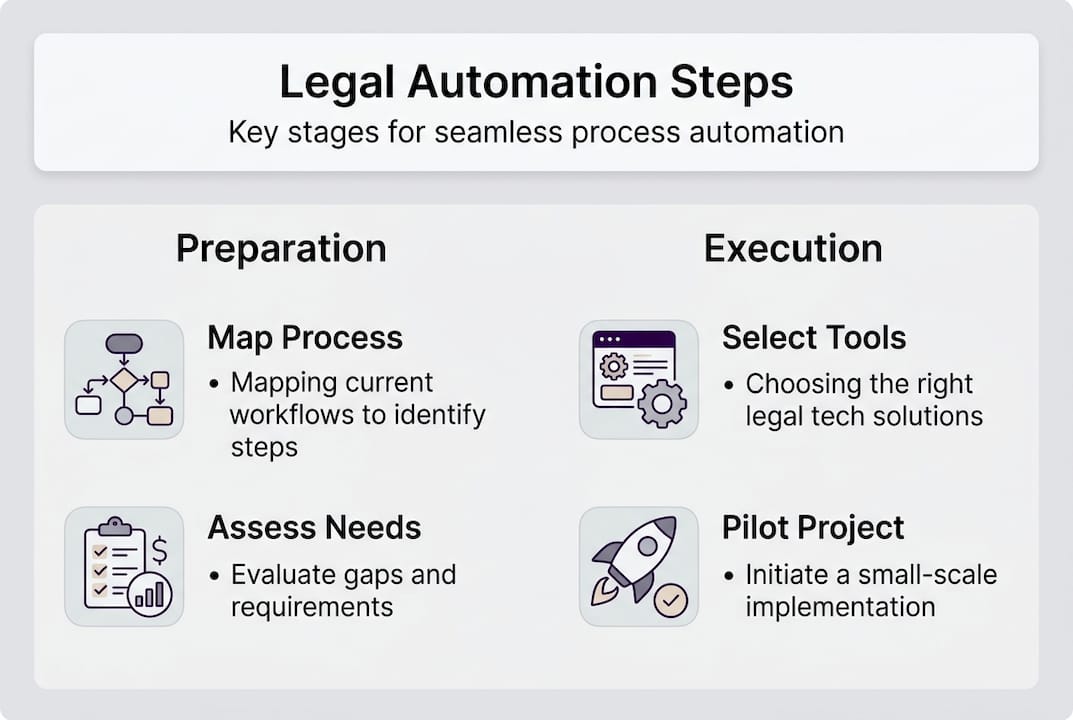
Step-by-step guide to process automation in legal ops
Armed with your assessment, you are ready to take concrete steps toward automation. The approach below applies whether you are automating contract management, invoice processing, or compliance tracking.
Legal departments deploying AI automation tools jumped from 18% to 30% in a single year. That pace of adoption means the window for gaining a competitive edge through early implementation is narrowing.
Following AI-driven automation success steps and reviewing key tasks to automate will give you a stronger foundation before you select tools.
Step-by-step automation process:
- Map the target process in detail, including inputs, outputs, decision points, and exceptions
- Select a best-fit tool based on your existing systems, integration requirements, and process complexity
- Build and configure the automation in a test environment, not in production
- Run a controlled pilot with a small group of users and a limited data set
- Measure pilot results against your pre-defined success criteria
- Refine and scale based on what the pilot data shows
For contract management specifically, a typical automation sequence looks like this: a contract request triggers intake form submission, the system classifies the contract type, routes it to the right attorney, tracks review deadlines, sends reminders, logs all actions, and archives the executed document. No manual coordination required at any step.
Common platforms used in legal automation include contract lifecycle management tools, matter management systems, e-billing platforms, and document assembly software. Reviewing essential AI automation types helps match the right tool category to each process.
Pro Tip: Pilot with a scope small enough that you can observe every outcome. If something breaks in a pilot of 20 contracts, you catch it. If it breaks after you have scaled to 2,000, the cost is much higher.
Avoiding common pitfalls and maximizing ROI
With your process mapped and plan in motion, it is critical to avoid missteps that can derail success. Most automation failures in legal ops are not technology failures. They are people and process failures.
The most frequent reasons automation stalls or fails:
- Poor change management: Staff who do not understand why automation is happening will work around it or resist it
- Unclear objectives: Automating without defined success metrics makes it impossible to know if the project worked
- Technical sprawl: Adding tools that do not integrate with existing systems creates new manual work instead of eliminating it
- Insufficient training: Teams that are not trained on new workflows revert to old habits
- Scope creep: Expanding the automation scope mid-project delays delivery and inflates costs
Building a sustainable rollout means addressing these risks before they surface. Assign a dedicated project owner. Communicate the purpose and benefits to every affected team. Set a realistic timeline and hold to it.
Reviewing digital collaboration strategies and financial automation guidance provides additional context for keeping cross-functional rollouts on track.
“Automation without stakeholder alignment is just expensive confusion. The firms that succeed treat change management as a core project deliverable, not an afterthought.”
83% of legal ops managers expect automation demand to grow, which means the pressure to get this right will only increase. Building a sustainable strategy now protects your investment and positions your firm to scale without starting over.
Measuring success: Outcomes and verification in legal automation
After avoiding common mistakes, the next priority is ensuring your automation delivers lasting, measurable value. Measurement is not optional. Without it, you cannot justify continued investment or identify where to improve.
Key metrics to track in legal automation:
- Cycle time reduction: How much faster are contracts executed or invoices approved?
- Error rate: Are compliance filings and document outputs more accurate than before?
- Cost per transaction: Has the labor cost per processed matter or invoice decreased?
- Backlog volume: Is the queue of pending tasks shrinking?
- Escalation frequency: Are exceptions being caught and handled faster?
| Metric | Before automation | After automation |
|---|---|---|
| Contract review cycle | 12 days average | 4 days average |
| Invoice error rate | 8% of submissions | Under 2% |
| Compliance deadline misses | 3 to 5 per quarter | Near zero |
| Staff hours on admin tasks | 30% of total time | Under 10% |
Firms report improved output quality and stronger risk control after automation adoption, but those gains require active monitoring to sustain.
Steps to verify and tune your automation results:
- Review performance data against baseline metrics at 30, 60, and 90 days post-launch
- Conduct structured interviews with users to identify friction points not visible in the data
- Audit a sample of automated outputs for accuracy and compliance alignment
- Adjust rules, thresholds, or routing logic based on what the data reveals
- Document changes and re-baseline metrics after each adjustment
Using secure AI systems for compliance ensures your measurement infrastructure itself meets regulatory standards, which matters when audit trails are part of your legal obligations.
A contrarian view: Why ‘just automate everything’ backfires in legal ops
Having explored how to measure success, it is worth addressing a pattern we see repeatedly in legal ops: the assumption that more automation is always better.
It is not. Automating the wrong processes creates new inefficiencies. It locks in bad workflows at machine speed. It generates audit trails full of errors. And it frustrates the teams who have to work around the outputs.
The firms that get the most value from automation are selective. They target high-volume, rules-driven processes where consistency matters more than judgment. They leave complex, context-dependent work to people. They treat automation as a tool for freeing up human capacity, not replacing human thinking.
Failed initiatives almost always share one trait: technology was deployed before the process was understood. The tool becomes a scapegoat for what was actually a process design problem.
The practical lesson from process management experience is this: prioritize quality of automation over quantity. One well-designed, well-adopted workflow delivers more long-term value than ten half-built ones.
Ready to future-proof your legal operations?
The guide above gives you a clear path from assessment to execution to measurement. But knowing the steps and having the right implementation partner are two different things. Ailerons.ai works with legal operations teams to design and deploy agentic AI systems that handle real workflow complexity, not just simple task triggers. From contract management to compliance tracking to billing support, we build automation that integrates with your existing systems and scales with your firm. Explore Ailerons case studies to see how similar teams have reduced overhead and improved accuracy. When you are ready to move from planning to results, Ailerons.ai is the place to start.
Frequently asked questions
Which legal processes are easiest to automate first?
Contract management, invoice processing, and compliance tracking are the most practical starting points because they are rules-based and high-volume, making them straightforward to define and configure for automation.
How long does legal process automation take to implement?
A typical automation project takes between 2 and 6 months depending on process complexity, data readiness, and how many stakeholders are involved in sign-off and testing.
What ROI can I expect from automating legal operations?
Most legal ops managers report reduced manual workload, lower costs, and faster turnaround within 6 months, with measurable efficiency gains visible in cycle times and error rates.
What are the biggest risks of poor process automation?
The top risks are loss of oversight, increased error rates when automation is misconfigured, and team resistance caused by inadequate change management and training before launch.
Recommended
- Digital collaboration in legal firms: cut costs 75% in 2026 | Ailerons IT Consulting
- Process Automation Tutorial for Agentic AI in Compliance Workflows | Ailerons IT Consulting
- Master financial operations automation steps for 2026 | Ailerons IT Consulting
- Office Operations Automation Trends: Agentic AI Impact | Ailerons IT Consulting