

Many business leaders still assume automation only works for simple, isolated tasks. That belief costs time and money. Recent advances in AI now enable automation to reduce execution time 151x compared to manual methods, even for complex, multi-step office workflows. This guide shows how multi-step task automation works, how to implement it in your organization, and the risks and rewards you need to understand before you start.
Table of Contents
- Defining multi-step task automation
- How does multi-step task automation work?
- Benefits and measurable impact on office efficiency
- Limitations, risks, and what most leaders miss
- How to implement multi-step task automation in your organization
- Ready to streamline your office with multi-step automation?
- Frequently asked questions
Key Takeaways
| Point | Details |
|---|---|
| What it is | Multi-step task automation orchestrates whole office workflows, not just single actions. |
| How it works | AI coordinates sequences of tasks by understanding context, triggers, and decisions. |
| Efficiency gains | Automation can cut processing time by over 100x compared to manual effort. |
| Know the risks | Automation success rates drop for very long or complex workflows—so audit regularly. |
| Getting started | Begin with well-defined, repeatable workflows and scale after early wins. |
Defining multi-step task automation
To bring clarity, let’s start by establishing what exactly multi-step task automation means for your office and why it matters.
Multi-step automation orchestrates a series of interrelated activities, not just isolated actions. Think of it as the difference between approving a single invoice and managing the entire invoice lifecycle: receiving the document, extracting data, validating against purchase orders, routing for approval, recording payment, and sending confirmation.
Single-step automation handles one discrete action. Multi-step automation coordinates sequences where each action depends on the outcome of the previous one. When a new hire joins your company, multi-step automation can create their email account, assign them to the right systems, schedule orientation meetings, send welcome materials, and notify their manager. Each step flows into the next without manual intervention.
AI handles both the logic and decision-making in sequence. It reads context, evaluates conditions, and determines the next action based on real-time data. This capability becomes more valuable as complexity and volume increase. A single invoice approval might not justify automation. Processing hundreds of invoices monthly with variable approval paths and exception handling absolutely does.
Comparison: Single-step vs. multi-step automation
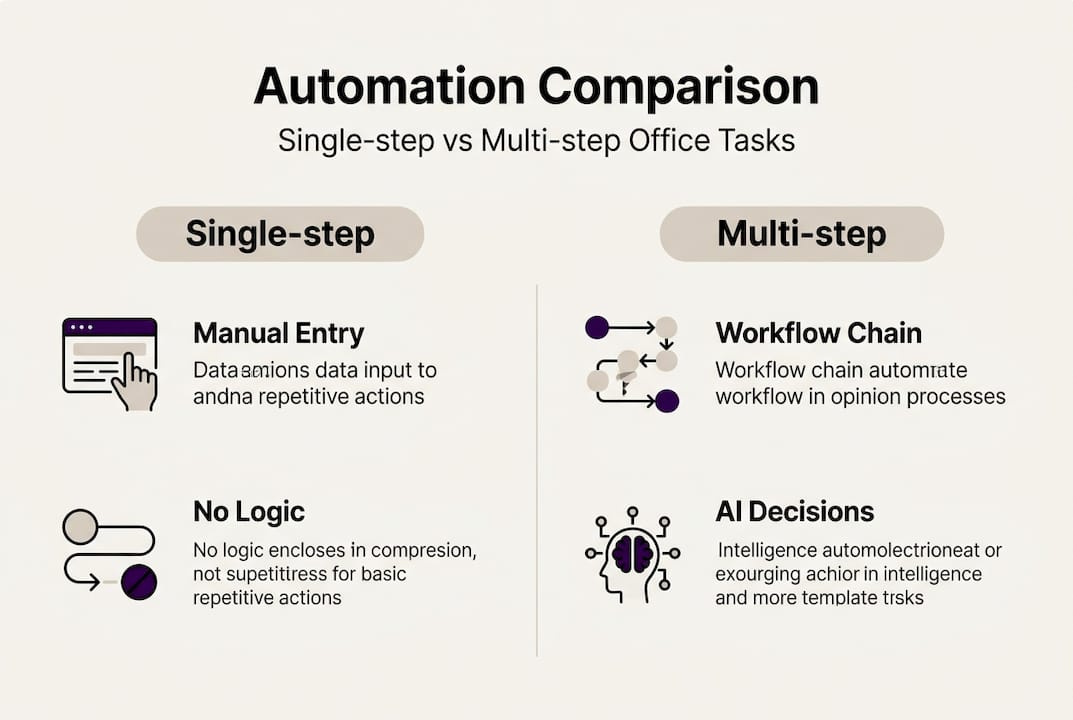
| Feature | Single-step automation | Multi-step automation |
|---|---|---|
| Scope | One isolated task | Connected sequence of tasks |
| Decision logic | Minimal or none | Context-aware, conditional |
| Error handling | Simple retry | Intelligent escalation |
| Business value | Moderate | High for complex workflows |
| Implementation | Quick, straightforward | Requires workflow mapping |
The growing business value comes from eliminating handoffs, reducing delays, and maintaining consistency across every instance of a process. When you automate a multi-step workflow, you’re not just saving time on individual tasks. You’re removing the friction between them.
Key characteristics of effective multi-step automation:
- Sequential logic: Each step triggers based on the completion or outcome of the previous step
- Conditional branching: The workflow adapts based on data, rules, or exceptions
- Cross-system integration: Actions span multiple platforms without manual data transfer
- Error recovery: The system detects issues and either resolves them or escalates appropriately
For more context on how AI transforms office operations, explore AI-driven office automation and the types of AI automation available today.
How does multi-step task automation work?
Now that you know what multi-step task automation is, let’s see how it’s actually implemented and orchestrated in real offices.
The automation process follows a clear sequence:
- Event trigger: Something initiates the workflow, such as receiving an email, a form submission, or a scheduled time
- Workflow logic: The system evaluates conditions and determines which path to follow
- Task orchestration: Individual actions execute in sequence, with data passing between steps
- Error handling: The system detects failures and either retries, escalates, or logs the issue
- Output and reporting: Results are recorded, stakeholders are notified, and metrics are captured
AI analyzes context and makes decisions at each step. When processing a travel request, the system reads the destination, dates, and budget. It checks company policy, compares flight options, books the most cost-effective choice, adds calendar events, and updates the expense tracking system. The Jenova benchmark shows Claude 4.5 Opus at 76% accuracy on long-context orchestration tasks like these.
A real-world example: automated client intake. A prospect fills out a contact form. The system creates a CRM record, assigns a sales representative based on territory and workload, sends a personalized welcome email, schedules a discovery call, and adds the prospect to a nurture sequence. Each action depends on data from the previous step. The sales rep receives a notification only after everything else completes successfully.
Pro Tip: Start small and map out dependencies before automating long workflows. Identify every decision point, exception scenario, and data handoff. This planning prevents logic errors and makes troubleshooting easier when issues arise.
The technology behind this orchestration includes workflow engines, API integrations, and AI models trained to understand business context. The system doesn’t just execute commands. It interprets intent, evaluates options, and adapts to variations in input data.
For deeper insights into how AI maintains awareness across workflow steps, review context-aware automation and strategies for improving business workflows.
Benefits and measurable impact on office efficiency
With the fundamentals in place, the most important question for managers is this: how much impact can multi-step task automation really have on performance?
The data is striking. Research shows n8n automation reduced execution time 151x compared to manual processing. For a task that takes an employee 30 minutes, automation completes it in under 12 seconds. That’s not incremental improvement. That’s transformation.

Accuracy matters as much as speed. Claude Sonnet achieved 24% success on CMU office tasks, while specialized automation platforms reached much higher rates on routine workflows. The difference lies in task complexity and how well the system is trained for specific business contexts.
Measured performance across workflow lengths
| Workflow complexity | Manual time | Automated time | Success rate |
|---|---|---|---|
| Short (3-5 steps) | 15-30 min | 10-20 sec | 85-95% |
| Medium (6-10 steps) | 45-90 min | 30-60 sec | 70-85% |
| Long (11-20 steps) | 2-4 hours | 1-3 min | 50-70% |
| Very long (20+ steps) | 4-8 hours | 3-10 min | Below 10% |
For mid-sized businesses, these numbers translate to tangible gains:
- Speed: Complete routine workflows in seconds instead of hours
- Error reduction: Eliminate manual data entry mistakes and missed steps
- Compliance: Ensure every process follows the same approved sequence
- Instant reporting: Capture metrics and outcomes automatically for every workflow instance
- Resource reallocation: Free staff to focus on judgment-based work that requires human expertise
A company processing 200 invoices monthly saves roughly 100 hours of staff time with multi-step automation. That’s 1,200 hours annually, equivalent to more than half a full-time employee. The cost savings compound when you factor in reduced errors, faster payment cycles, and better vendor relationships.
The numbers also reveal diminishing returns. As workflows grow longer and more complex, success rates drop. This pattern appears consistently across studies. Automation excels at moderate-length, well-defined processes. It struggles with highly variable or exceptionally long task chains.
To see how these principles apply across different operational areas, explore ways to boost operational efficiency, identify AI tasks to automate, and review AI solutions for office operations.
Limitations, risks, and what most leaders miss
Still, even the best technology has boundaries. A smart automation strategy means knowing what not to automate and how to avoid the biggest traps.
Main risks in multi-step automation:
- Logic errors: A flaw in one step cascades through the entire workflow
- Compounded mistakes: Small errors multiply as they pass from step to step
- Context loss: Long workflows may lose track of initial intent or critical details
- Integration failures: When systems don’t communicate properly, workflows break
- Inadequate exception handling: Edge cases that weren’t anticipated cause failures
Research confirms these concerns. Automation success drops below 10% for very long-horizon tasks according to METR studies. The longer the workflow, the more opportunities for something to go wrong. Each additional step introduces new dependencies and potential failure points.
What most leaders overlook: the need for regular audits, fallback procedures, and hybrid AI-human workflows. Automation shouldn’t run completely unsupervised, especially in the early stages. Build in checkpoints where humans review outputs or approve critical decisions. Monitor error rates and adjust logic as you learn how the system performs in real conditions.
Pro Tip: Start with moderate-length workflows and scale cautiously. Automate processes with 5-10 steps first. Measure results for several weeks. Refine your approach based on what you learn. Then tackle longer, more complex workflows with confidence.
Know when to use automation and when to keep humans in control:
- Good candidates: High-volume, repeatable processes with clear rules and predictable variations
- Poor candidates: Highly creative work, novel situations requiring judgment, processes that change frequently
The goal isn’t to automate everything. It’s to automate the right things in the right way. That requires understanding both the technology’s capabilities and its limits.
For practical guidance on which tasks to prioritize, review the administrative automation process.
How to implement multi-step task automation in your organization
Once you know where the boundaries are, you can plan automation that delivers true value and reliability. Here’s a proven way to get started in your organization.
-
Assess needs: Identify high-volume, time-consuming workflows that follow consistent patterns. Talk to the people who perform these tasks daily. They know where the pain points are.
-
Choose platforms: Select automation tools that integrate with your existing systems. Prioritize platforms with strong API support, visual workflow builders, and robust error handling.
-
Map workflow: Document every step, decision point, and exception scenario. Create a flowchart that shows how data moves and what triggers each action.
-
Pilot small: Automate one segment of the workflow first. Test thoroughly with real data. Monitor performance and gather feedback from users.
-
Scale up: Once the pilot proves successful, expand to the full workflow. Add more processes gradually, applying lessons learned from earlier implementations.
-
Audit regularly: Review automation performance monthly. Check error rates, completion times, and user satisfaction. Adjust logic and rules as business needs evolve.
Supporting roles matter. IT teams handle technical integration and security. Department stakeholders define business rules and approve workflow logic. Change champions help colleagues adapt to new processes and provide feedback for improvements.
Real-world office automation frameworks validated through academic and enterprise studies confirm this approach works across industries and company sizes.
Quick checklist for mid-sized companies:
- Clear documentation of current manual processes
- Executive sponsorship and budget allocation
- IT resources for integration and support
- Training plan for staff who will work with automated systems
- Metrics to measure success and ROI
- Contingency plans for when automation fails
Implementation timelines vary. Simple workflows can be automated in days. Complex, multi-system processes may take weeks or months. Plan for iteration. Your first version won’t be perfect, and that’s expected. The value comes from continuous improvement over time.
For a structured approach to getting started, explore business automation steps designed specifically for small and mid-sized organizations.
Ready to streamline your office with multi-step automation?
If you’re ready to move from learning to action, here’s how Ailerons can support your automation journey.
Ailerons AI specializes in designing and deploying agentic AI systems that handle multi-step workflows from start to finish. We work with mid-sized companies to identify high-impact automation opportunities, build custom workflows that integrate with your existing systems, and provide ongoing support as your needs evolve.
Our approach focuses on practical outcomes: faster processing, fewer errors, better compliance, and measurable time savings. We don’t automate for the sake of automation. We automate to solve real business problems and deliver ROI you can track.
Browse automation case studies to see how companies in your industry have benefited from multi-step task automation. Each case study includes specific metrics, implementation timelines, and lessons learned.
Ready to discuss your specific needs? Visit our consulting solutions page to schedule a readiness assessment. We’ll review your current workflows, identify automation opportunities, and provide a clear roadmap for implementation.
Frequently asked questions
What types of office workflows benefit most from multi-step task automation?
Routine, repetitive, high-volume workflows like onboarding, invoice processing, and client communication gain the most from multi-step task automation. These processes follow predictable patterns and consume significant staff time when performed manually.
How reliable is AI-powered multi-step task automation?
For typical office workflows, leading AI models deliver 76% accuracy in orchestrating long-context tasks. Reliability drops for very complex or lengthy workflows, making workflow length an important consideration during planning.
Are there risks in automating too many steps at once?
Yes, as the workflow grows in length, both context loss and error risk increase, with measured automation success rates dropping below 10% for very long processes. Start with moderate-length workflows and scale gradually.
How do you start implementing multi-step automation?
Begin by mapping out your workflow, automating a manageable segment, and scaling as you measure results and refine processes. Best practice involves starting with moderate-length workflows and expanding with proven success.
Recommended
- Master the Administrative Task Automation Process Today | Ailerons IT Consulting
- Step-by-Step Guide to AI-Driven Office Automation Success | Ailerons IT Consulting
- Intelligent Automation Cuts Admin Overhead 72% in 2026 | Ailerons IT Consulting
- Step by Step Business Automation Guide for SMBs | Ailerons IT Consulting