

TL;DR:
- Manual office workflows waste time, cause errors, and build invisible overhead that worsens weekly. Automating tasks like approvals and data entry promotes efficiency, accuracy, and scalability without increasing headcount. Success depends on careful planning, standardized processes, focused automation of high-volume tasks, and ongoing monitoring to refine results.
Manual office workflows drain time, generate errors, and create invisible overhead that compounds every week. If you’re spending hours chasing approvals, re-entering data, or following up on routine tasks, you already know the problem. Learning how to automate office workflows is no longer a competitive advantage reserved for large enterprises. It’s a practical necessity for any organization that wants to operate with precision and scale without adding headcount. This guide covers what to prepare, how to build, and how to verify automation that actually works.
Table of Contents
- Key takeaways
- What you need before automating office workflows
- Step-by-step process to build automated workflows
- Common pitfalls and how to avoid them
- Measuring success and refining over time
- My honest take on workflow automation
- How Ailerons can support your automation goals
- FAQ
Key takeaways
| Point | Details |
|---|---|
| Prepare before you build | Audit existing tasks and define clear objectives before selecting any automation tool. |
| Start with the happy path | Automate your smallest, most reliable core sequence first before adding exceptions or AI layers. |
| Balance automation and human oversight | Reserve human approval checkpoints for high-risk actions only to avoid creating new bottlenecks. |
| Measure with defined KPIs | Track cycle time, error rates, and throughput to validate and improve automation over time. |
| Iterate continuously | Treat automation as an ongoing operating model, not a one-time project. |
What you need before automating office workflows
Most automation projects fail before a single workflow is built. The reason is usually the same: teams jump straight into tooling without understanding what they’re actually trying to fix. 72% of organizations use AI in at least one business function as of 2026, yet many still lack structured pipelines that deliver consistent results. The gap is almost always in preparation, not technology.
Identifying what to automate
Not every task deserves automation. The best candidates share a few clear traits:
- Repetitive and rule-based. Data entry, invoice routing, appointment reminders, and status update emails repeat on predictable schedules with predictable logic.
- Error-prone when done manually. If a task generates frequent mistakes when humans execute it, automation adds accuracy and audit trail value.
- High volume or time-sensitive. Tasks that occur dozens of times per day or require fast turnaround are strong fits.
- Cross-system. If completing a task requires touching three or four platforms, automation eliminates the manual hand-off friction.
Tasks that require significant judgment, creative output, or relationship management belong in the human column. Automation works best on volume and consistency, not nuance.
Defining objectives and assessing your environment
Before selecting tools, define what success looks like. Set specific targets: reduce invoice processing time from five days to one, cut data entry errors by 80%, or eliminate manual follow-up emails entirely. Vague goals produce vague results.
Next, audit your existing systems. Identify which platforms hold the data your workflows touch, whether your tools have native APIs or integration support, and where data currently gets stuck or duplicated. This step shapes every tool and design decision that follows.
Pro Tip: Build a cross-functional team from the start. Include a workflow architect or process owner, a representative from the team doing the work, and an IT contact who knows your systems. Automation built without the people who run the process almost always misses something critical.
The table below outlines the categories of tools commonly used across office workflow automation projects:
| Tool category | Primary use | Examples |
|---|---|---|
| No-code/low-code platforms | Build and deploy workflows without engineering resources | Power Automate, Zapier, Make |
| AI orchestration layers | Handle reasoning, multi-step decisions, and exceptions | Agentic AI platforms |
| Document processing | Extract, classify, and route document data | OCR and document AI tools |
| CRM and ERP integrations | Sync data across business systems automatically | Native connectors and middleware |
| Monitoring and logging | Track workflow health and audit decisions | Built-in dashboards and log services |
Step-by-step process to build automated workflows
78% of organizations that deploy AI without a structured implementation framework fail to see measurable impact. A clear, step by step automation workflow process closes that gap between deployment and results.
-
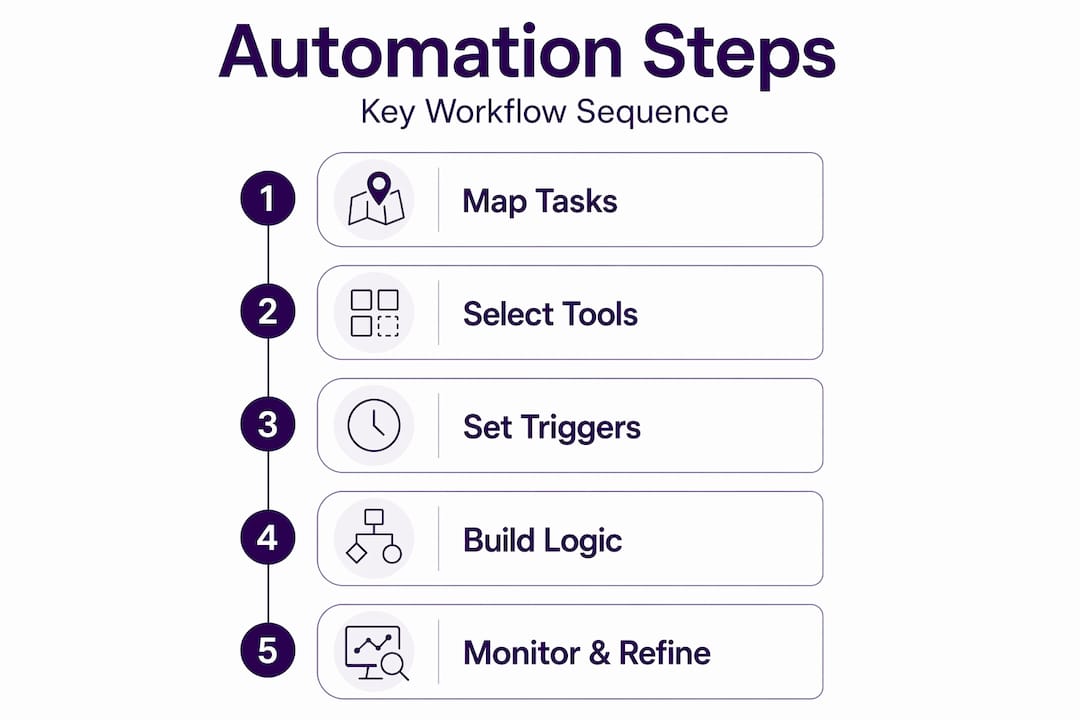
Map the current workflow in full detail. Document every step, trigger, decision point, and system involved. Include who performs each action, what data is needed, and what happens when something goes wrong. You cannot automate what you have not documented.
-
Identify triggers, conditions, and actions. Every automated workflow needs a starting event (trigger), a set of rules governing behavior (conditions), and defined outputs (actions). A purchase order approval, for example, might trigger on document receipt, apply conditions based on vendor and amount, and route to a manager or auto-approve below a set threshold.
-
Start with the happy path. Build a five-to-nine-step core sequence that covers the most common, uncomplicated version of the workflow. Get that running reliably before adding exception handling, edge cases, or AI reasoning layers. This approach prevents complexity from collapsing the entire build.
-
Design human approval checkpoints selectively. Approving every item in a workflow turns automation into a slower version of the manual process. Trigger reviews only on high-value transactions, customer-facing outputs, or cases flagged as anomalies.
-
Use no-code or low-code platforms for initial builds. Business users with process knowledge, not just IT teams, should be able to participate in building and modifying workflows. This speeds up iteration and keeps the logic grounded in operational reality.
-
Test in a controlled environment before deploying. Run the workflow against real but non-production data. Check for edge cases, failed conditions, and system latency. Build in retry logic with explicit counters. Explicit retry counters and termination conditions prevent the infinite retry loops that corrupt data in high-stakes workflows.
-
Deploy gradually and monitor from day one. Roll out to a single team or process segment first. Set performance baselines before launch so you have a clear comparison point when analyzing early results.
Pro Tip: An intelligent workflow system uses modular layers: triggers, actions, logic, human-in-the-loop points, and monitoring. Building in this order makes the system easier to test, adjust, and expand.
Common pitfalls and how to avoid them
Even well-planned automation projects run into trouble. Knowing where they typically break down saves you weeks of troubleshooting.

The most frequent mistake is trying to automate a workflow that has not yet been standardized. If your team handles the same process three different ways depending on who’s available, automation will simply lock in inconsistency at scale. Standardize the process on paper first, then build the automation.
A close second is building too much too fast. Automating full complex workflows at once is how most beginner projects fail. The happy path approach described above exists specifically because partial, reliable automation is more valuable than complete, fragile automation.
Here are the most common failure points to watch for after deployment:
- No error handling. Workflows that lack retry logic and failure notifications go silent when something breaks. You find out days later when a process has stalled.
- Over-approval design. Human-in-the-loop systems need clear guardrails like validation, rate limiting, and escalation paths. Without them, adding approval steps creates bottlenecks rather than controls.
- Missing escalation paths. When a workflow hits an unexpected state, it needs a named human owner to receive the exception with full context. Without this, exceptions either fail silently or pile up in a queue no one monitors.
- No change management. Teams that are not trained on new workflow logic will find workarounds, which undermines the automation entirely.
A clear escalation path must route uncertain or high-impact outputs to named human owners with full context for reliable decisions. Escalation preserves velocity while controlling risks in AI-powered workflows.
Monitoring is not optional after deployment. Set alerts for workflow failures, unusual processing times, and unexpected output volumes. Treat anomalies as signals worth investigating, not background noise.
Measuring success and refining over time
Deploying automation is the midpoint, not the finish line. You need a measurement framework to confirm the business value you expected is actually materializing, and to identify where further improvement is possible.
Start by defining KPIs before you launch. Useful metrics for office workflow automation include:
- Cycle time reduction. How long does the process take end to end compared to the manual baseline?
- Error rate. What percentage of outputs contain errors or require manual correction after automation?
- Throughput. How many transactions or tasks does the workflow process per day or week?
- Exception rate. What percentage of cases require human intervention, and why?
- Time to resolution. For exception cases, how long does it take to resolve and return to normal flow?
Approval logs capturing decisions, edits, and escalation reasons provide both compliance evidence and a continuous improvement signal. If certain exception types appear repeatedly, that is a design gap worth fixing at the workflow level.
Gather input from the people using and managing the workflow. They will surface friction points that logs alone cannot reveal. Use that feedback to refine conditions, adjust thresholds, and extend automation scope into adjacent tasks. Over time, build shared workflow templates and logic libraries that other teams can reuse, which multiplies the value of each build without multiplying the effort. For a broader look at how AI is reshaping this space, the office automation trends Ailerons has documented are worth reviewing.
My honest take on workflow automation
I’ve seen enough automation projects across professional and operational teams to have a clear opinion on what separates the ones that deliver from the ones that don’t.
The technology is rarely the limiting factor. The real work is upstream: getting the process documented accurately, getting the right people in the room, and resisting the pressure to automate everything at once. I’ve watched teams spend months building elaborate multi-branch workflows that failed in production because no one had standardized the underlying process first.
What I’ve learned is that workflow automation is as much about organizational process design as it is about technology. You’re not replacing a task. You’re encoding a decision model. That model has to be correct before it runs without supervision.
I’m also skeptical of automation designs that try to remove human judgment entirely. The better approach is to design approval systems that reserve human oversight for the moments that genuinely require it, which means routing exceptions to the right person with the right context, not creating approval steps for every transaction. Guardrails and clear human roles are what allow AI automation to scale safely without creating new categories of risk.
The teams I’ve seen get this right treat automation as an operating model they continually refine, not a project they close out. That mindset is what produces compounding returns over time.
— Sam
How Ailerons can support your automation goals
If you’re ready to move beyond basic task automation and build workflows that can reason, adapt, and manage exceptions without constant human intervention, Ailerons designs and deploys agentic AI systems built specifically for office and operational environments. These systems go further than scripts and rule-based bots by operating with context awareness and goal-oriented logic across your existing platforms.
Ailerons works with organizations on end-to-end workflow builds covering administrative processes, document management, billing, compliance tasks, and internal coordination. The work is outcome-focused and grounded in real operational requirements. To see how this translates in practice, the Ailerons case studies detail specific implementations and measurable results. Reach out to discuss what your workflows could look like with intelligent orchestration in place.
FAQ
What types of tasks are best suited for office workflow automation?
Repetitive, rule-based tasks with high volume and predictable logic are the strongest candidates. Examples include invoice routing, data entry, approval notifications, and report distribution.
How do you start automating without disrupting existing operations?
Start with the happy path: map your simplest, most reliable core workflow segment and automate that first. Deploy to one team or process before expanding, and keep manual fallbacks available during the transition period.
What is human-in-the-loop automation?
Human-in-the-loop automation routes specific workflow steps to a human reviewer rather than processing them automatically. Best practice is to trigger human review only on high-risk, high-value, or anomalous cases to avoid creating bottlenecks.
How do you measure whether workflow automation is working?
Define KPIs before launch, including cycle time, error rate, throughput, and exception rate. Compare post-automation metrics against the manual baseline and use approval logs to identify recurring gaps in workflow logic.
What is the difference between traditional automation and agentic AI?
Traditional automation follows fixed rules and scripts. Agentic AI can reason across steps, handle variability, coordinate between systems, and escalate intelligently. It manages multi-step tasks from start to finish rather than executing a single predetermined action.
Recommended
- Step-by-Step Guide to AI-Driven Office Automation Success | Ailerons IT Consulting
- Step-by-step workflow automation guide for business leaders | Ailerons IT Consulting
- Step by Step Business Automation Guide for SMBs | Ailerons IT Consulting
- Improving Business Workflows with AI: Achieve Automation | Ailerons IT Consulting