

Most organizations assume document automation means scanning paper and storing files digitally. That assumption leaves significant efficiency gains on the table. True end-to-end document automation covers every step from intake to output, using AI-driven extraction, business rule application, and system integration to move work forward without manual intervention. For operations leaders and IT decision-makers, understanding this full scope is what separates incremental improvement from genuine operational transformation.
Table of Contents
- What is end-to-end document automation?
- The six stages of the automation workflow
- AI’s role in advanced document automation
- Comparing partial vs. end-to-end automation
- Benefits and ROI for operations leaders
- Implementation best practices and common pitfalls
- Explore real-world results with Ailerons AI-driven solutions
- Frequently asked questions
Key Takeaways
| Point | Details |
|---|---|
| Complete automation workflow | End-to-end automation covers digital intake to integration for seamless document processing. |
| AI adds intelligence | Large language models and AI extract, validate, and enrich data far beyond basic OCR. |
| Business impact | Full automation slashes errors, speeds approvals, and brings measurable efficiency improvements. |
| Implementation best practices | Start with high-impact cases, integrate early, and maintain human oversight for reliable results. |
What is end-to-end document automation?
End-to-end document automation is the practice of handling every stage of a document’s lifecycle through connected, intelligent systems. It starts when a document enters your organization and ends when the relevant data has been extracted, validated, and acted upon inside your core business platforms.
This is fundamentally different from simple document management, which typically handles storage and retrieval. Full automation adds intelligence and action. The core stages include ingestion, OCR and parsing, AI-driven data extraction, validation, business rules application, and integration with downstream systems. Each stage feeds the next without requiring a person to move the work along.
For operations teams, the practical benefits are direct:
- Faster processing cycles because documents move through workflows automatically
- Fewer manual errors because data is extracted and validated by software, not typed by hand
- Full visibility into where every document sits in the process at any given moment
- Consistent compliance because rules are applied the same way every time
- Easier auditing because every action is logged and traceable
Pro Tip: Before selecting any automation platform, map your current document flow end to end. Knowing exactly where manual handoffs occur helps you identify which stages will deliver the fastest ROI after automation.
If you want a broader view of how this fits into your overall operations strategy, the end-to-end automation overview on the Ailerons blog is a useful starting point.
The six stages of the automation workflow
Understanding the individual stages helps you evaluate platforms and plan implementation. Here is how a complete workflow breaks down.

| Stage | What happens | Key technology |
|---|---|---|
| 1. Ingestion | Documents arrive via email, upload, scan, or API | Digital mailroom, connectors |
| 2. OCR and parsing | Text and structure are extracted from images or PDFs | Optical character recognition |
| 3. AI extraction | Meaning, entities, and values are identified | LLMs, NLP models |
| 4. Validation and HITL | Data is checked; exceptions go to human review | Rules engines, review queues |
| 5. Business rules | Routing, approvals, and compliance checks are applied | Workflow logic, policy rules |
| 6. Integration and output | Data exports to ERP, CRM, or other systems | APIs, connectors, notifications |
The typical automation stages follow this sequence because each step depends on the output of the previous one. Skipping or weakening any stage creates gaps that require manual intervention.
Here is a numbered breakdown of what each stage means in practice:
- Ingestion captures documents from every source your organization uses, whether that is email attachments, web uploads, scanned mail, or direct API feeds.
- OCR and parsing converts images and PDFs into machine-readable text, preserving structure like tables and form fields.
- AI extraction goes beyond reading text. It identifies what the data means, such as recognizing an invoice number versus a purchase order number.
- Validation and human-in-the-loop (HITL) review catches errors and routes exceptions to a human reviewer without stopping the entire workflow.
- Business rules application determines what happens next: who approves it, which system receives it, and whether any compliance flags apply.
- Integration and output pushes clean, validated data directly into your ERP, CRM, or accounting platform.
Pro Tip: Build your HITL review queue around exception types, not document types. This keeps human reviewers focused on genuine edge cases rather than routine documents that automation handles reliably.
For a practical guide on making each of these stages work together, see AI-driven automation success and how AI in business process management applies across operational contexts.
AI’s role in advanced document automation
OCR reads text. AI understands it. That distinction matters more than most organizations realize when they are evaluating automation platforms.
Traditional OCR tools extract characters from a page. They do not know whether a number is a total amount, a reference code, or a date. Large language models (LLMs) and AI reasoning layers add that interpretive capability. They can classify documents, extract named entities, infer relationships between data points, and flag anomalies that a rules engine would miss.
AI and LLMs extract meaning, automate decisioning, and adapt business rules dynamically, moving document workflows from rigid scripts to intelligent, context-aware processing.
In practical terms, AI enables automation to:
- Classify incoming documents without manual tagging, even when formats vary across vendors or clients
- Extract data from unstructured text, such as contract clauses or email bodies, not just structured forms
- Detect inconsistencies between fields, such as a ship date that precedes an order date
- Trigger conditional actions based on document content, such as escalating a contract above a certain value for legal review
- Adapt to new document formats with minimal retraining, reducing maintenance overhead
This is the core reason why improving workflows with AI produces results that rule-based automation alone cannot match. For a broader view of where this technology is heading, the automation trends in operations resource covers the shift toward agentic AI systems.
Comparing partial vs. end-to-end automation
Many organizations have already automated parts of their document workflows. A scanning solution here, an approval tool there. The problem is that partial automation creates islands. Data extracted in one system has to be manually re-entered into the next.
End-to-end automation eliminates those manual gaps by connecting every stage into a single, auditable flow.
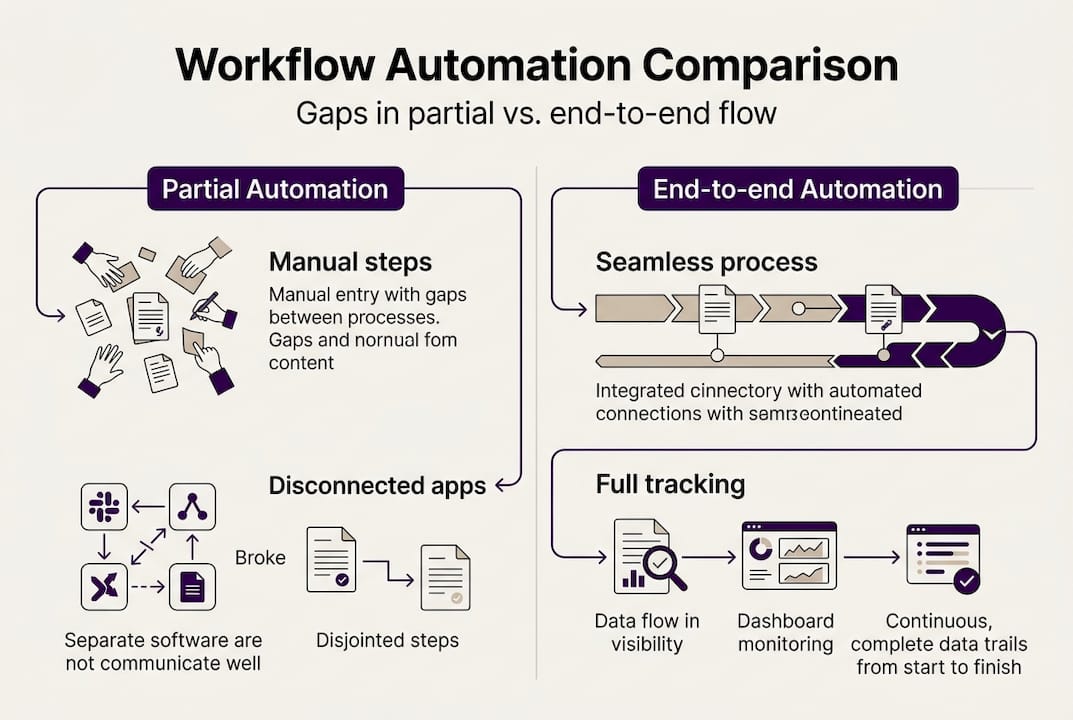
| Dimension | Partial automation | End-to-end automation |
|---|---|---|
| Coverage | Individual tasks only | Full document lifecycle |
| Data handoffs | Manual re-entry between systems | Automated, API-driven |
| Error risk | High at transition points | Minimized through validation |
| Audit trail | Fragmented across tools | Unified and complete |
| Scalability | Limited by manual steps | Scales with volume |
| Compliance | Inconsistent | Enforced at every stage |
The operational implications are significant:
- Scaling volume does not require proportional headcount increases when handoffs are automated
- Compliance audits become straightforward because every action is recorded in one system
- Error rates drop because data is validated before it reaches downstream systems, not after
- Process visibility improves because managers can see bottlenecks in real time rather than discovering them after delays
For a structured look at the different AI automation types available to operations teams, that resource breaks down the options clearly.
Benefits and ROI for operations leaders
The business case for end-to-end document automation is grounded in measurable outcomes. Automation reduces administrative overhead and enhances efficiency across the document lifecycle, which translates directly into cost savings and faster cycle times.
Key operational gains include:
- Reduction in manual data entry errors, which typically run between 1% and 5% in high-volume environments
- Faster invoice and approval cycles, often cut from days to hours
- Stronger audit trails that reduce compliance risk and preparation time
- Staff reallocation from repetitive data tasks to higher-value work
To build a credible ROI case for leadership, follow these steps:
- Baseline your current costs. Measure time spent per document type, error rates, and rework frequency.
- Identify your highest-volume processes. Invoice processing, onboarding documents, and compliance filings typically offer the fastest payback.
- Quantify error-related costs. Include rework time, late payment penalties, and compliance exposure.
- Model post-automation throughput. Use vendor benchmarks or pilot data to project processing time reductions.
- Include integration savings. Eliminating manual re-entry between systems has compounding value as volume grows.
The AI-driven efficiency guide provides a practical framework for structuring this analysis within your organization.
Implementation best practices and common pitfalls
Successful deployment depends on planning decisions made before any software is configured. The technology works. The risk is in how organizations approach rollout.
Here is what separates successful implementations from stalled ones:
- Start with high-volume, labor-intensive document types. Invoice processing and employee onboarding documents are common starting points because the volume justifies the investment quickly.
- Integrate with core systems early. Connecting to your ERP or CRM from the start prevents the partial automation trap. Integration and HITL validation are essential parts of a successful deployment, not optional add-ons.
- Build human review into the design. Exception handling is not a failure of automation. It is a feature. Design your HITL queues before go-live.
- Avoid tool fragmentation. Selecting separate vendors for each stage recreates the manual handoff problem you are trying to solve.
- Plan for change management. Staff need to understand what the system handles and what requires their judgment. Unclear boundaries create workarounds.
- Test with real documents before full rollout. Pilot with a representative sample of your actual document variety, including edge cases and unusual formats.
Pro Tip: Assign a process owner for each automated workflow, not just a technical owner. Someone who understands the business rules and exception patterns will catch configuration gaps that IT alone might miss.
For organizations in regulated industries, the automation for compliance resource covers how to design workflows that satisfy audit and regulatory requirements from the start.
Explore real-world results with Ailerons AI-driven solutions
The concepts covered in this guide are already producing measurable results for mid-sized enterprises that have moved from fragmented tools to connected, intelligent document workflows. Ailerons.ai designs and deploys agentic AI systems that handle the full document lifecycle, from intake through integration, without requiring organizations to stitch together multiple point solutions. You can review enterprise automation case studies to see how these implementations perform across different industries and document types. If you are ready to assess what end-to-end automation could look like for your specific workflows, the IT and AI consulting team at Ailerons is available to help you build a practical, scalable plan.
Frequently asked questions
How does end-to-end document automation differ from basic document scanning?
Basic scanning digitizes documents for storage. End-to-end automation goes further, applying AI extraction, validation, and system integration so that data is acted upon automatically, not just archived.
What business processes see the highest ROI from full automation?
High-volume, repeatable processes deliver the fastest returns. Invoice processing, employee onboarding, and compliance filings benefit most because manual workload reduction compounds quickly at scale.
Can legacy systems integrate with modern document automation solutions?
Yes. Most enterprise automation platforms include integration layers designed for legacy systems. ERP and CRM integration is a standard part of the automation workflow, not a custom add-on.
What role does human review play in automated document workflows?
Human-in-the-loop steps handle exceptions, edge cases, and compliance-sensitive decisions. HITL validation keeps automation accurate without removing human judgment where it genuinely matters.
Recommended
- Step-by-Step Guide to AI-Driven Office Automation Success | Ailerons IT Consulting
- Improving Business Workflows with AI: Achieve Automation | Ailerons IT Consulting
- Process Automation Tutorial for Agentic AI in Compliance Workflows | Ailerons IT Consulting
- End-to-End Business Automation: Agentic AI Impact | Ailerons IT Consulting
- AI alapú workflow kialakítás lépésről lépésre vállalatoknak